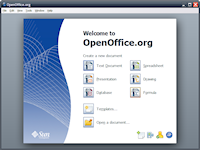
Openoffice.org 3.0.1 Novell Edition for Windows eMedia Kit

47010281OpenOffice.org Novell® Edition for Windows* is a full productivity suite which provides word processing, spreadsheet, presentation, drawing and database capabilities. With OpenOffice.org Novell Edition for Windows, enterprises can dramatically lower costs while gaining the key functionality of Microsoft* Office and interoperability with Microsoft Office file formats.

Key Features of OpenOffice.org Novell Edition for Windows OpenOffice.org Novell Edition for Windows contains enhancements and bug fixes, especially for interoperability with Microsoft Office and other word processing programs, that are not available in the standard edition. These enhancements include:

  • Microsoft Excel*: Compatibility: Improved Excel compatibility for certain built-in functions (e.g., CELL, INFO, INDIRECT), hyperlinks and filters, improved ergonomics, and support for “R1C1” style addresses. Improved performance on certain text functions such as SEARCH. Natural sorting option in cell range sorting.
  • Excel VBA Macro Interoperability: OpenOffice.org Novell Edition eases the migration of many macros from Microsoft Excel. Although not all macros can be successfully migrated, this interoperability offers more than the standard edition, which does not support migration of macros.
  • Data Pilots: Data Pilots are interoperable with Microsoft Office PivotTables*. OpenOffice.org Novell Edition substantially improves the Data Pilot feature, making it possible to edit pilots after creation.
  • Enhanced Fonts: Licensed fonts from Agfa* Monotype* which are metrically identical and visually compatible with some of the key Microsoft fonts. This allows OpenOffice.org Novell Edition to match fonts when opening documents originally composed in Microsoft Office, and very closely match pagination and page formatting.
  • EMF+Support: The ability to render EMF+ formatted graphics
  • SVG Support: The ability to import scalable vector graphics.
  • Import File Formats: Microsoft Works, WordPerfect* text and graphics, T602 files, OfficeOpen XML, and more.
  • Groupwise® Integration:OpenOffice.org Novell Edition includes improved integration with ODMA (Open Document Management Architecture) services, for example for GroupWise. If you have the GroupWise client installed on the machine, OpenOffice.org Novell Edition will offer to open documents from GroupWise, or save documents in GroupWise.

System Requirements

Microsoft Windows minimum system requirements:

  • Windows 2000* (Service Pack 3 or higher), Windows XP* (Service Pack 2 or higher), Windows Vista*
  • 128 MB RAM
  • 200 MB available disk space
  • 800 x 600 or higher resolution with at least 256 colors

Microsoft Windows recommended system requirements

  • Windows 2000 (Service Pack 3 or higher), Windows XP (Service Pack 2 or higher), Windows Vista
  • 512 MB RAM
  • 200 MB available disk space
  • 1024 x 600 or higher resolution with at least 65,536 colors

VMware vCenter Server 2.5 Update 4 – includes Converter Enterprise (formerly VMware VirtualCenter)

VMware Infrastructure Management Installer | 23 February 2009 (Localized version)
VirtualCenter 2.5 Server Update 4 | 23 February 2009 | Build 147704
Virtual Infrastructure Client | 23 February 2009 | Build 147694

VMware Infrastructure Management Installer | 23 February 2009 (English only version)
VirtualCenter 2.5 Server Update 4 | 23 February 2009 | Build 147633
Virtual Infrastructure Client | 23 February 2009 | Build 147633
For information about the builds that are available for download, refer Selecting the Appropriate VMware Infrastructure Management Installer.

Check frequently for additions and updates to these release notes.

OpenOffice.org Portable 3.0.1 Released

Submitted by John T. Haller on February 18, 2009 – 4:42pm

OpenOffice.org logoPortableApps.com is proud to announce the release of OpenOffice.org Portable 3.0.1 in Dutch, English, French, German, Hungarian, Italian, Japanese, Polish, Portuguese, Russian, Simplified Chinese and Spanish. It’s the popular OpenOffice.org office suite bundled with a PortableApps.com launcher as a portable app so you can edit your documents, spreadsheets and presentations on the go. This latest release updates OpenOffice.org 3.0.1, has an improved installer and adds 6 languages to our supported packages and was done with cooperation from the OpenOffice.org team. It’s packaged in PortableApps.com Format so it can easily integrate with the PortableApps.com Suite. And it’s open source and completely free.
Read on for more details…

Features

OpenOffice.org Portable is a full-featured office suite that’s compatible with Microsoft Office, Word Perfect, Lotus and other office applications. It’s easy-to-use and feature-rich, performing nearly all of the functions you’d expect in an office suite, but at no cost. Learn more about OpenOffice.org…
New in This Release

This release updates OpenOffice.org to 3.0.1 (release notes) and features an improved installer. The new version has a better support for the linuistic components and works better on systems without local installed MSVCRT runtime. Packages in Dutch, Hungarian, Polish, Portuguese, Russian and Spanish were also added.

Novell Client 2 for Windows Vista/2008 – Public Beta

4701028 The Novell Client for Windows Server 2008 supports Windows Server 2008 and will run on Intel and AMD CPUs for both the x86 and x64 versions of Windows Server 2008. Note that this client will NOT install on Windows Server 2003 or any earlier version of Windows, nor on any other CPU platform for Windows Server 2008. The Novell Client for Windows Server 2008 will not be supported for Windows Server 2008 "core" installations, nor any Windows Server 2008 installation where terminal services isn’t an available Windows Server 2008 feature.

The Novell Client for Windows Server 2008 is based off the Novell Client SP1 for Windows Vista client code, and closely replicates the functionality of the Novell Client for Windows Vista, Novell Client for Windows XP/2003, and Novell Client for Linux including the following features:

– Simultaneous login to the desktop and eDirectory / NetWare / OES
– Login Script Processing
– Mapped drives
– Volume/Directory Space Restrictions
– Terminal Service login scenarios such as TSClientAutoAdminLogon

And many other features that have been part of the Novell Client over the years. 

XenDesktop 3

citrixWoensdag kwam Citrix met XenDesktop 3, met daarin ‘Streaming Desktop’. Daarmee kan het besturingssysteem vanaf een server via het netwerk worden gestart. Daarmee wordt alle kracht van een desktop benut, maar houdt de it-afdeling toch de mogelijkheid om alles centraal te beheren. “Dit werkt het beste wanneer je over een relatief krachtige thin client beschikt, of over een aantal gestandaardiseerde pc’s”, aldus een woordvoerder van Citrix. Bij Desktop Streaming kunnen er geen grote afwijkingen in de hardware zijn, omdat alle hardware configuratie-informatie in het image zit dat wordt gestreamd. Dus hoe minder afwijkingen, hoe meer mensen van dat ene image gebruik kunnen maken. In vergelijk met de traditionele Server Based Computing concepten heb je dus veel minder servers nodig, omdat de desktop niet meer op de server draait. Desktop Streaming zal onderdeel uitmaken van de ‘Advanced’, ‘Enterprise’ en ‘Platinum’ versies van XenDesktop 3. Deze worden eind februari leverbaar. De prijzen van deze drie zijn respectievelijk 195, 295 en 395 dollar per gelijktijdige gebruiker. Twee versies zijn er ook zonder Desktop Streaming; Standard en Express. Die laatste is gratis. Bedrijven die wel nog gewoon de desktops op de server willen laten draaien, kunnen er dankzij een zekere vorm van optimalisatie met XenDesktop 3 meer draaien op één server; bij een server met twee quad-core processors tussen de 50 en 55 desktops, aldus Citrix. In het beheer is ‘profile management’ geïntegreerd, dankzij techniek die met de overname van Sepago vorig jaar in handen van Citrix kwam.
Daarnaast is de manier waarop de XenDesktop omgaat met multimedia veranderd; de server zal voortaan de gecomprimeerde data naar de desktop sturen, waarna de desktop voor de verwerking (het uitpakken) zorgt. Dit moet de ervaring voor de gebruiker verbeteren, waarmee XenDesktop interessanter wordt voor een grotere groep. Hiervoor roept Citrix de ‘HDX’-techniek in het leven, een techniek die er ook voor zorgt dat meer usb-apparaten aan een client kunnen worden aangesloten.

Gnome Partition Editor 0.4.2

image

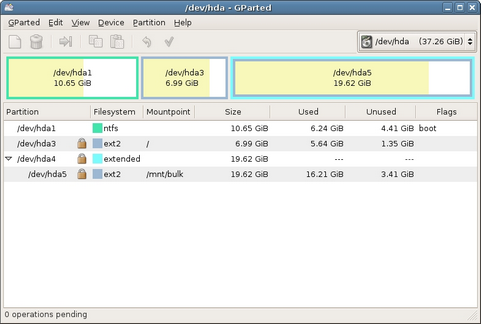
Vandaag is er een nieuwe versie van Gnome Partition Editor verschenen, te weten 0.4.2. Met GParted is het mogelijk om een harde schijf te partitioneren en bestaande partities te wijzigen. Het programma zelf is niet zo groot, maar meestal wordt het in de vorm van een live-cd uitgebracht waardoor het op elk platform gebruikt kan worden. De laatste live-cd die nu van SourceForge kan worden opgehaald, bevat op dit moment echter nog stable-versie 0.4.1-2 en testbuild 0.4.2 pre-release 1, maar daar komt hopelijk snel verandering in. Hieronder is te vinden wat er allemaal in de 0.4.2-release veranderd is:

Key changes include:

  • Added support for ext4 file system
    • Support for ext4 is built into version 2.6.28 of the Linux kernel
    • e2fsprogs version 1.41.0 or higher required
  • Created application help manual
  • Updated gparted manual page
  • Made text beside field labels selectable (i.e., copy/paste UUID)
  • Added lvm2 physical volume detection
  • Reduced file system information disk reads to improve performance
  • Fixed application crash when saving details and locale not set
  • Enhanced copy/paste checks when MBR/EBR involved

See the Release Notes for more details.

Gnome Partition Editor screenshot (481 pix)

Website
GParted

Download
http://downloads.sourceforge.net/gparted/gparted-0.4.2.tar.bz2?modt…